
3 months ago
Track meals, macros, and nutrition history — all through conversation with Claude. 100% free.
Overview
Nutrition MCP
A remote MCP server for personal nutrition tracking — log meals, track macros, and review nutrition history through conversation.
Quick Start
Already hosted and ready to use — just connect it to your MCP client:
https://nutrition-mcp.com/mcp
On Claude.ai: Customize → Connectors → + → Add custom connector → paste the URL → Connect
On first connect you'll be asked to register with an email and password. Your data persists across reconnections.
Demo
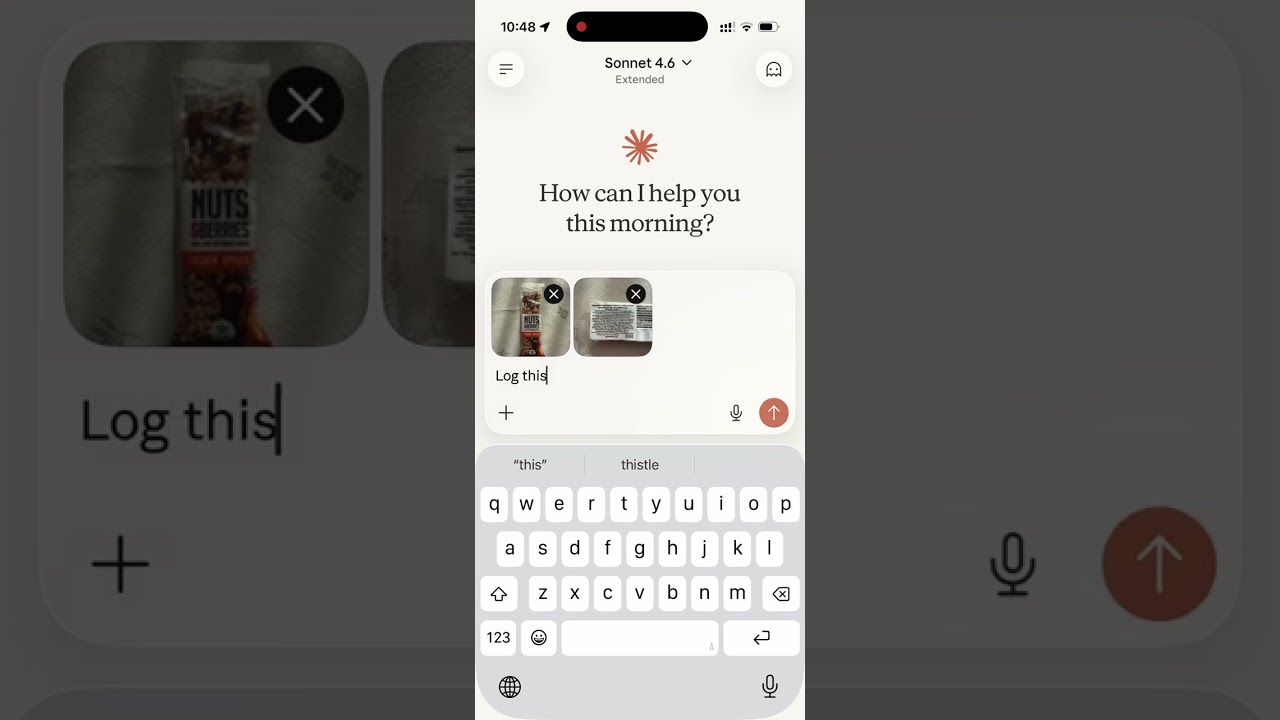
Read the story behind it: How I Replaced MyFitnessPal and Other Apps with a Single MCP Server
Tech Stack
- Bun — runtime and package manager
- Hono — HTTP framework
- MCP SDK — Model Context Protocol over Streamable HTTP
- Supabase — PostgreSQL database + user authentication
- OAuth 2.0 — authentication for Claude.ai connectors
MCP Tools
| Tool | Description |
|---|---|
log_meal | Log a meal with description, type, calories, macros, notes |
get_meals_today | Get all meals logged today |
get_meals_by_date | Get meals for a specific date (YYYY-MM-DD) |
get_nutrition_summary | Daily nutrition totals for a date range |
delete_meal | Delete a meal by ID |
update_meal | Update any fields of an existing meal |
delete_account | Permanently delete account and all associated data |
Supabase Setup
- Create a Supabase project
- Enable Email Auth (Authentication → Providers → Email) and disable email confirmation
- Run the following SQL in the SQL Editor:
-- Meals
CREATE TABLE meals (
    id uuid PRIMARY KEY DEFAULT gen_random_uuid(),
    user_id uuid NOT NULL REFERENCES auth.users(id),
    logged_at timestamptz NOT NULL DEFAULT now(),
    meal_type text CHECK (meal_type IN ('breakfast', 'lunch', 'dinner', 'snack')),
    description text NOT NULL,
    calories integer,
    protein_g numeric,
    carbs_g numeric,
    fat_g numeric,
    notes text
);

-- OAuth access tokens
CREATE TABLE oauth_tokens (
    token text PRIMARY KEY,
    user_id uuid NOT NULL REFERENCES auth.users(id),
    expires_at timestamptz NOT NULL,
    created_at timestamptz NOT NULL DEFAULT now()
);

-- OAuth authorization codes (short-lived, single-use)
CREATE TABLE auth_codes (
    code text PRIMARY KEY,
    redirect_uri text NOT NULL,
    user_id uuid NOT NULL REFERENCES auth.users(id),
    code_challenge text,
    expires_at timestamptz NOT NULL,
    created_at timestamptz NOT NULL DEFAULT now()
);

-- Refresh tokens
CREATE TABLE refresh_tokens (
    token text PRIMARY KEY,
    user_id uuid NOT NULL REFERENCES auth.users(id),
    expires_at timestamptz NOT NULL,
    created_at timestamptz NOT NULL DEFAULT now()
);

-- Enable Row Level Security on all tables
ALTER TABLE meals ENABLE ROW LEVEL SECURITY;
ALTER TABLE oauth_tokens ENABLE ROW LEVEL SECURITY;
ALTER TABLE auth_codes ENABLE ROW LEVEL SECURITY;
ALTER TABLE refresh_tokens ENABLE ROW LEVEL SECURITY;

-- Allow access for the service role
CREATE POLICY "Allow all for service role" ON meals
    FOR ALL USING (true) WITH CHECK (true);
CREATE POLICY "Allow all for service role" ON oauth_tokens
    FOR ALL USING (true) WITH CHECK (true);
CREATE POLICY "Allow all for service role" ON auth_codes
    FOR ALL USING (true) WITH CHECK (true);
CREATE POLICY "Allow all for service role" ON refresh_tokens
    FOR ALL USING (true) WITH CHECK (true);
- Copy the service role key from Project Settings → API and use it as
SUPABASE_SECRET_KEY
Environment Variables
| Variable | Description |
|---|---|
SUPABASE_URL | Your Supabase project URL |
SUPABASE_SECRET_KEY | Supabase service role key (bypasses RLS) |
OAUTH_CLIENT_ID | Random string for OAuth client identification |
OAUTH_CLIENT_SECRET | Random string for OAuth client authentication |
PORT | Server port (default: 8080) |
Generate OAuth credentials:
openssl rand -hex 16   # use as OAUTH_CLIENT_ID
openssl rand -hex 32   # use as OAUTH_CLIENT_SECRET
Development
bun install
cp .env.example .env   # fill in your credentials
bun run dev             # starts with hot reload on http://localhost:8080
Connect to Claude.ai
- Open Claude.ai and click Customize
- Click Connectors, then the + button
- Click Add custom connector
- Fill in:
- Name: Nutrition Tracker
- Remote MCP Server URL:
https://nutrition-mcp.com/mcp
- Click Connect — sign in or register when prompted
- After signing in, Claude can use your nutrition tools. If you reconnect later, sign in with the same email and password to keep your data.
API Endpoints
| Endpoint | Description |
|---|---|
GET /health | Health check |
GET /.well-known/oauth-authorization-server | OAuth metadata discovery |
POST /register | Dynamic client registration |
GET /authorize | OAuth authorization (shows login page) |
POST /approve | Login/register handler |
POST /token | Token exchange |
GET /favicon.ico | Server icon |
ALL /mcp | MCP endpoint (authenticated) |
Deploy
The project includes a Dockerfile for container-based deployment.
- Push your repo to a hosting provider (e.g. DigitalOcean App Platform)
- Set the environment variables listed above
- The app auto-detects the Dockerfile and deploys on port
8080 - Point your domain to the deployed URL
License
Server Config
{
  "mcpServers": {
    "nutrition": {
      "url": "https://nutrition-mcp.com/mcp"
    }
  }
}