
A Model Context Protocol (MCP) server that calls APIs using YAML config files.
Overview
MCP API Client Overview
The MCP API Client is a Model Context Protocol (MCP) server that enables seamless API integration using simple YAML configuration files.
Designed for rapid prototyping, automation, and low-code/no-code scenarios, it allows users to connect APIs to their AI models or automation workflows without advanced programming skills.
Key Features
- YAML-based API configuration: Define multiple API endpoints and their parameters in a single YAML file.
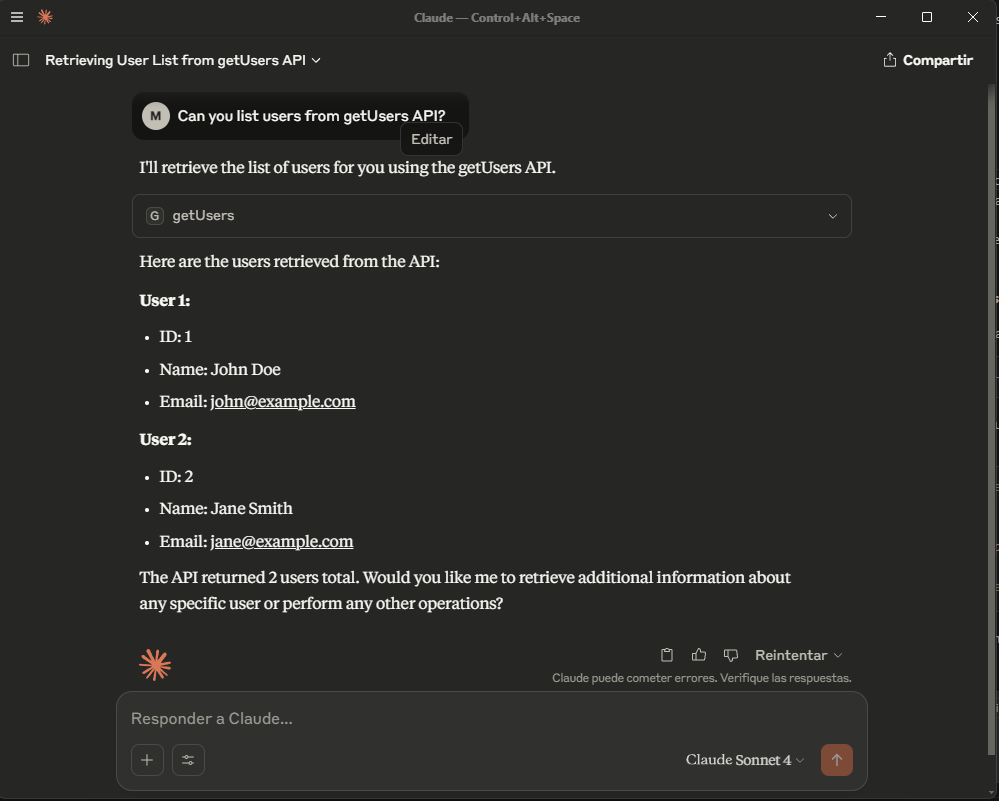
- Automatic MCP tool generation: Instantly create MCP tools and fetch APIs from your YAML config.
- Supports all HTTP methods: GET, POST, PATCH, PUT, DELETE (partial support).
- Environment variable interpolation: Securely manage secrets and tokens (coming soon).
- Flexible request configuration: Set headers, query parameters, and request bodies.
- No-code/low-code friendly: Ideal for non-developers and rapid prototyping.
- Secure API access: Manage sensitive data via environment variables.
Use Cases
- AI Model Integration: Connect LLMs or other AI models to external APIs for data retrieval, enrichment, or action execution.
- Automation: Integrate with platforms like N8N, Make.com, or Zapier via webhooks.
- Data Pipelines: Orchestrate API calls as part of ETL or data processing workflows.
- API Gateway: Expose multiple backend APIs through a unified MCP interface.
- Rapid Prototyping: Build and test API workflows quickly for demos or hackathons.
Getting Started
- Initialize a default API YAML config:
npx -y mcp-api-client --init - Start the test server for local development:
npx -y mcp-api-client --test-server - Add the MCP API Client to your agent or tool configuration and START ASKING!
See the Content tab for YAML configuration details and examples.
Server Config
{
  "mcpServers": {
    "mcp-api-client": {
      "command": "npx",
      "args": [
        "-y",
        "mcp-api-client",
        "path-to-your-config-api.yaml"
      ]
    }
  }
}